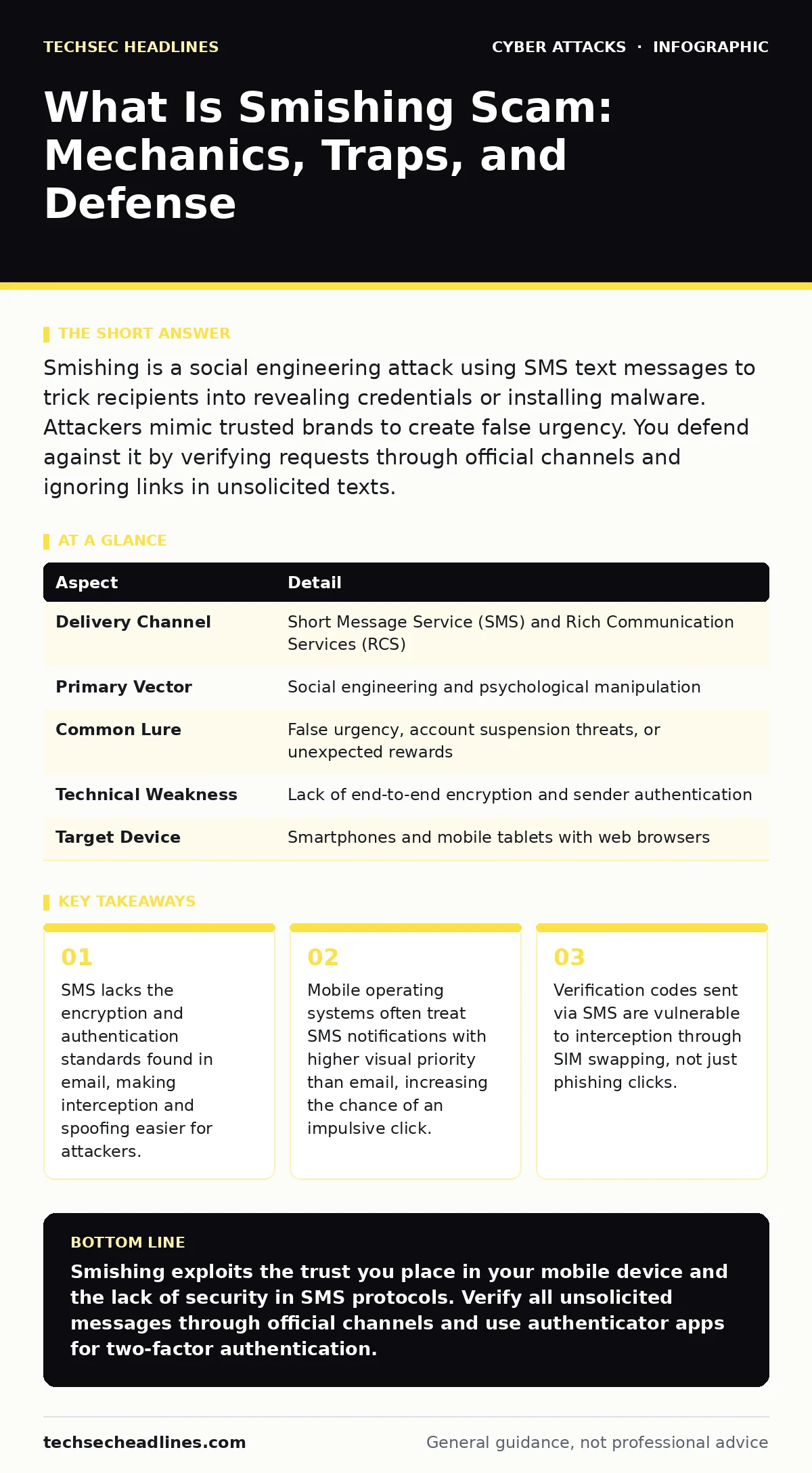
Smishing is a social engineering attack using SMS text messages to trick recipients into revealing credentials or installing malware. Attackers mimic trusted brands to create false urgency. You defend against it by verifying requests through official channels and ignoring links in unsolicited texts.
The Mechanics of SMS Deception
Imagine receiving a text message that looks exactly like a notification from your bank. The message warns of unusual activity and provides a link to secure your account. This is the core mechanism of smishing, a portmanteau of SMS and phishing. It relies on the assumption that you trust your phone more than your computer.
Mobile devices are personal, always-on, and often used in moments of distraction. Attackers exploit this intimacy. They craft messages that appear to come from legitimate organizations, using shortened URLs to hide the true destination. The goal is never to hack your phone directly through the text itself. The goal is to get you to perform an action that compromises your security.
| Aspect | Detail |
|---|---|
| Delivery Channel | Short Message Service (SMS) and Rich Communication Services (RCS) |
| Primary Vector | Social engineering and psychological manipulation |
| Common Lure | False urgency, account suspension threats, or unexpected rewards |
| Technical Weakness | Lack of end-to-end encryption and sender authentication |
| Target Device | Smartphones and mobile tablets with web browsers |
Why Smishing Works on Modern Phones
People often assume that because they use a smartphone, they are protected by modern security. This is a misconception. SMS technology was designed in the 1980s for simple text exchange. It does not include sender verification. An attacker can easily spoof the display number to make it look like a local business or a familiar brand. This is known as Caller ID spoofing, adapted for text.
When you see a message from "Amazon" or "Your Bank," the network did not verify that source. It only delivered the text. Mobile operating systems also prioritize these notifications. A banner drops from the top of your screen, demanding attention. This design choice increases the likelihood that you will react before you think. The cognitive load required to verify the sender is higher on a small screen than on a desktop.
Who Falls for Smishing Attacks
Smishing is not limited to a specific demographic. It affects anyone with a mobile phone and an internet connection. Students, professionals, and retirees are all equally vulnerable because the attack targets human psychology, not technical knowledge. Attackers often segment their targets based on data leaks. If your email was part of a breach, your phone number might be in the same database.
The attackers then tailor the message to match your likely interests. A student might receive a fake university login alert. A professional might get a message about a missed delivery from a courier service. The specificity of the message makes it harder to dismiss. The belief that "this must be real because it mentions my name" is the exact trap the attacker sets.
What Is Smishing Scam: The Execution Flow
Understanding what is smishing scam requires looking at the step-by-step execution. The attacker begins by acquiring a list of phone numbers. They then send bulk messages using automated systems. These systems can send thousands of texts per minute. The content is designed to trigger an emotional response. Fear is the most common lever.
Messages claim your account is locked, your payment failed, or your package is held at customs. The message includes a link. This link leads to a website that looks identical to the real service. The site asks for your username and password. Sometimes it asks for a one-time code. Once you enter the data, it goes straight to the attacker. You may see a success message, but your credentials are now compromised.
Common Misconceptions About Text Security
Many people believe that if a message comes from a known number, it is safe. This is incorrect. Attackers can reuse numbers from previous victims or spoof numbers that belong to legitimate businesses. Another common mistake is assuming that mobile phones are immune to malware. While iOS and Android have strict app stores, smishing can lead you to download malicious files through your browser.
These files may not be apps, but they can install background processes that steal data. Some users think that deleting the message stops the attack. If you clicked a link and entered data, deleting the message does nothing. The damage is already done. You must change your passwords and monitor your accounts.
See also: Voice Cloning Scams: Risks and Protection for Small Businesses
Defending Against SMS Threats
The most effective defense against smishing is verification. Never click links in unsolicited texts. If a message claims to be from a bank, open your banking app or type the website address manually into your browser. Check for notifications there. This breaks the chain of deception. You are interacting with the real service, not the attacker's clone.
Enable two-factor authentication on all your accounts. Use an authenticator app or a hardware key instead of SMS-based codes. SMS codes can be intercepted through SIM swapping, where an attacker tricks your carrier into moving your number to their SIM card. This allows them to receive your verification codes. By using a different method for two-factor authentication, you remove this vulnerability.
The Hidden Cost of Convenience
The trade-off for the convenience of SMS is a lack of security. SMS is convenient because it works on any phone, anywhere. It does not require an internet connection for basic texts. This universality comes at the cost of encryption and authentication. Email has evolved to include security headers like SPF, DKIM, and DMARC. These standards help verify that an email actually comes from the claimed sender.
SMS has no equivalent widespread standard. While RCS offers some improvements, it is not universally adopted. Until the underlying protocol changes, you must assume that any unsolicited text is suspicious. This mindset shift is the only reliable protection. Relying on carrier filters is insufficient. Attackers constantly change their tactics to bypass these filters.
Integrating Smishing Awareness Into Daily Habits
Protecting yourself from smishing requires integrating caution into your daily routine. It is not enough to know the definition. You must act on it. Treat every unsolicited text as a potential threat. This does not mean you should ignore all texts. It means you should pause before clicking. Take five seconds to ask yourself if you were expecting this message.
If the answer is no, do not engage. Report the message to your carrier if possible. This helps them identify and block bad actors. Share this knowledge with friends and family. Social engineering attacks often target entire households. By raising awareness, you create a community defense. The more people who understand the mechanics of smishing, the less effective it becomes.
Looking Beyond Text Messages
Smishing is part of a broader ecosystem of social engineering attacks. It often works in conjunction with other methods. Attackers may use spear phishing emails to gather more information about you before sending a targeted text. They may also use eavesdropping attacks to capture data if your network is insecure. Understanding these connections helps you see the big picture.
Security awareness training should cover all channels, not just email. Email filtering is a critical tool for corporate environments, but it does not protect personal SMS. Secure email gateways can block malicious links in emails, but they cannot stop a text message. You must apply the same skepticism to your phone as you do to your computer.
Romance scams often start with a text message. The attacker builds a relationship over time before asking for money or sensitive information. These scams rely on emotional manipulation rather than technical tricks. They are harder to detect because the attacker invests time in building trust. BGP hijacking is a different threat entirely, involving the manipulation of internet routing tables.
It is not related to smishing, but it shows that the internet infrastructure has multiple weak points. Attacks on data centers can lead to large-scale data breaches, providing attackers with the phone numbers they need for smishing campaigns. By understanding these related threats, you can better appreciate why protecting your personal data is so important.
Key takeaways
- SMS lacks the encryption and authentication standards found in email, making interception and spoofing easier for attackers.
- Mobile operating systems often treat SMS notifications with higher visual priority than email, increasing the chance of an impulsive click.
- Verification codes sent via SMS are vulnerable to interception through SIM swapping, not just phishing clicks.
Smishing exploits the trust you place in your mobile device and the lack of security in SMS protocols. Verify all unsolicited messages through official channels and use authenticator apps for two-factor authentication.
Frequently asked questions
Can my phone get a virus from just receiving a smishing text?
No, the text message itself is just data. You only risk infection if you click a link in the message and download a malicious file or app.
How do I know if a text from my bank is real?
Do not click links in the text. Open your banking app or website directly to check for notifications. Real banks will not ask for sensitive data via SMS.
Is it safe to reply to a smishing message?
No, replying confirms your number is active. This can lead to more targeted attacks. Delete the message and block the sender instead.
Do carrier spam filters stop all smishing?
No, carrier filters are not perfect. Attackers constantly change their tactics to bypass these filters. You must remain vigilant and verify messages manually.
How this guide was produced: written by the TechSec Headlines editorial team with AI assistance, checked against the public references listed below, and reviewed when the facts change. See our editorial policy or report an error.