End-of-life hardware loses vendor support for security patches and firmware updates. This creates permanent vulnerabilities in the physical device. You must isolate these devices from sensitive networks or replace them entirely to maintain security posture.
The Definition of Hardware Life
Hardware has a lifecycle distinct from software. When a vendor declares a device end-of-life, they stop providing security patches and firmware updates. This does not mean the device stops functioning. It means the device stops evolving defensively. You are left with a static attack surface. Attackers know the exact version of the code running on the chip. They can map every known vulnerability. You cannot patch these flaws with a software update. The only fix is replacement or strict isolation.
Stage 1: Vendor Support Withdrawal
Stage 1: Vendor Support Withdrawal
The first sign of decay is administrative. The vendor removes the device from their support portal. You can no longer download firmware updates. You can no longer report bugs. The vendor may also stop distributing cryptographic keys for secure boot. Secure boot ensures the device only runs trusted code. Without new keys, you cannot verify the integrity of future updates. This stage is quiet. The device works perfectly. You feel secure because nothing has broken. But the safety net is gone.
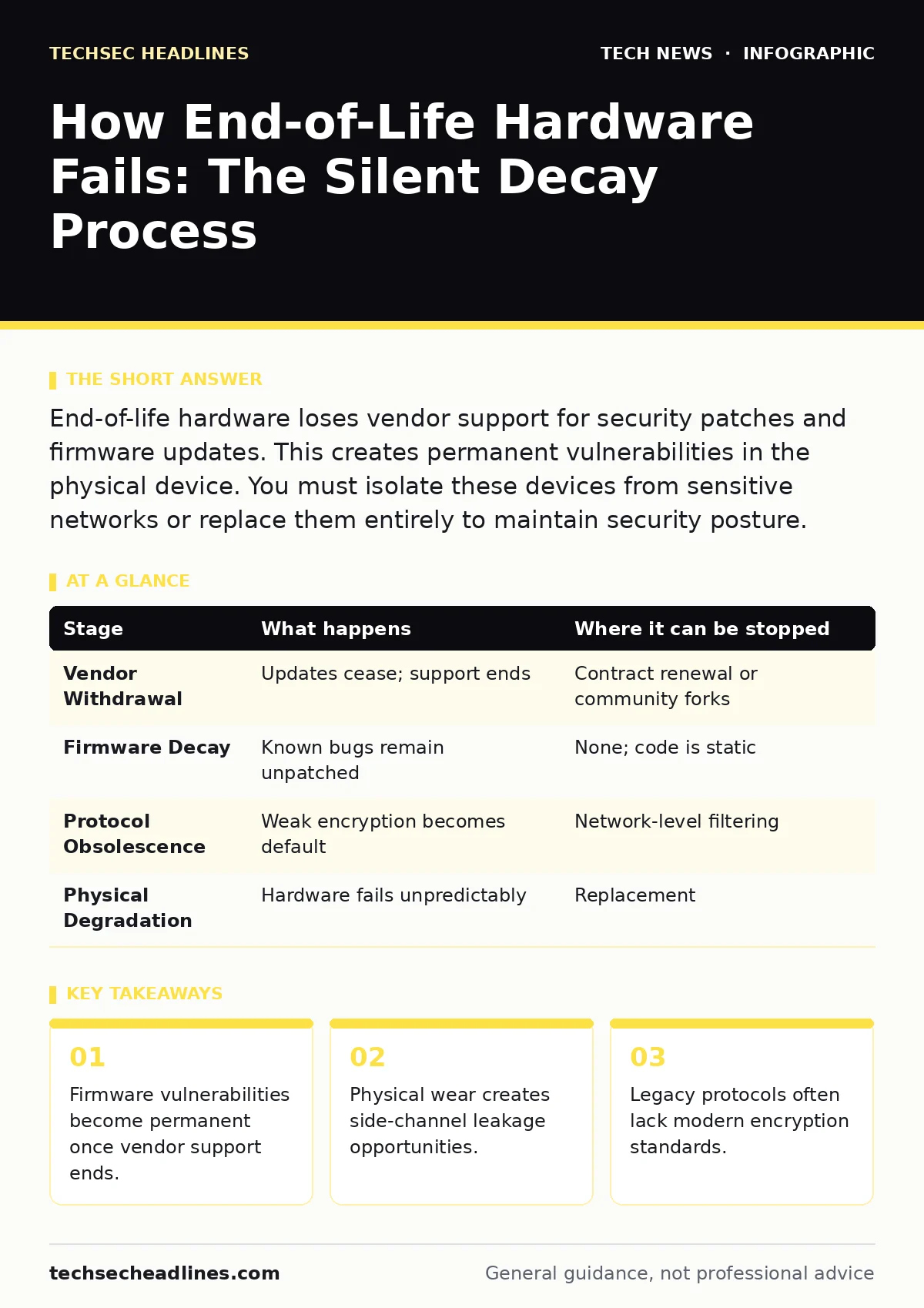
| Stage | What happens | Where it can be stopped |
|---|---|---|
| Vendor Withdrawal | Updates cease; support ends | Contract renewal or community forks |
| Firmware Decay | Known bugs remain unpatched | None; code is static |
| Protocol Obsolescence | Weak encryption becomes default | Network-level filtering |
| Physical Degradation | Hardware fails unpredictably | Replacement |
Stage 2: Firmware Staticity
Stage 2: Firmware Staticity
Firmware is the low-level software embedded in the hardware. It controls basic functions like power management and network initialization. When support ends, the firmware becomes static. Any vulnerability discovered in this code is now permanent. This includes buffer overflows and privilege escalation flaws. These flaws exist in the hardware’s brain. You cannot reinstall the operating system to fix them. The flaw is baked into the chip. This is different from application software. You can patch an application. You cannot patch the motherboard logic without new firmware.
Imagine a network switch that uses an outdated management interface. A researcher finds a way to bypass the login screen. The vendor has stopped making updates. That bypass works forever. Any device on the same network can exploit it. You cannot turn off the vulnerability. You can only turn off the device.
Stage 3: Protocol Obsolescence
Stage 3: Protocol Obsolescence
Hardware often locks you into specific communication protocols. Older devices may only support WPA2 for Wi-Fi security. Newer standards like WPA3 offer better protection against offline dictionary attacks. You cannot upgrade the protocol on old hardware. The chip physically lacks the instructions to handle the new math. This forces you to use weaker encryption. Weak encryption is easier to crack. It reduces the effort an attacker needs to intercept your data. This is a hidden cost of keeping old gear. You are trading convenience for cryptographic weakness.
This relates directly to Wi-Fi security practices. If your access point cannot support modern authentication, you must segment that network. Keep it separate from devices that hold sensitive data. Do not mix legacy hardware with modern security expectations. The weakest link determines the security of the entire chain.
Stage 4: Physical Degradation
Stage 4: Physical Degradation
Hardware ages physically. Capacitors leak. Solder joints crack. Thermal paste dries out. This degradation affects security in subtle ways. A failing voltage regulator can cause timing variations. These variations can be measured from the outside. Attackers use side-channel attacks to read data based on power consumption or electromagnetic emissions. Unstable hardware produces more noise. This noise can leak information about cryptographic keys. It is not a software bug. It is a physical failure. You cannot patch a leaking capacitor. The device becomes an unintentional data leak.
Stage 5: Supply Chain Erosion
Stage 5: Supply Chain Erosion
As hardware ages, the supply chain for replacement parts vanishes. You cannot get genuine spare components. Third-party sellers offer refurbished or unknown parts. These parts may have hidden backdoors. They may lack proper quality control. Installing a third-party motherboard into a server is risky. You do not know who manufactured it. You do not know if it was tampered with. This erodes the chain of trust. You are introducing unknown variables into a controlled environment. The risk of supply chain compromise increases with the age of the device.
This connects to USB security concerns. If you need to transfer data from an old device, you may use legacy USB controllers. These controllers often lack modern authentication checks. They can execute malicious code simply by being plugged in. Using old hardware increases your exposure to physical attack vectors.
Applying the Framework
You can apply this framework to any device. Start by checking the vendor’s support status. If support has ended, move to Stage 2. Check for known firmware vulnerabilities. If any exist, the device is high risk. Move to Stage 3. Check the encryption standards. If they are outdated, isolate the device. Move to Stage 4. Monitor for physical errors. If you see instability, replace the device. Move to Stage 5. Verify the source of any replacement parts. If you cannot verify them, do not install them.
This process helps you prioritize replacements. Not all old hardware is equally dangerous. A standalone printer is less risky than a network router. A router controls traffic flow. A printer just prints. Understand the role of the device. Assess the risk based on its function.
The Replacement Strategy
Replacing end-of-life hardware is not just about buying new gear. It is about planning. You must budget for replacement cycles. You must track device ages. You must know when support ends. This is proactive security. It prevents the crisis of a sudden failure. It avoids the cost of a breach. It maintains a modern security posture. You must treat hardware as a perishable security asset. It decays over time. You must manage that decay.
This ties into encryption strategies. New hardware supports newer algorithms. SHA-256 is still widely used, but newer hardware supports post-quantum cryptography. Planning for replacement ensures you can adopt new standards as they emerge. You stay ahead of the curve. You do not get stuck with obsolete tech.
The Bottom Line
End-of-life hardware is a silent threat. It fails long before it stops working. You must identify and replace these devices proactively. Do not wait for a breach. Manage your hardware lifecycle like you manage your software. Update, isolate, or replace. Keep your attack surface small. Keep your defenses modern.
Key takeaways
- Firmware vulnerabilities become permanent once vendor support ends.
- Physical wear creates side-channel leakage opportunities.
- Legacy protocols often lack modern encryption standards.
Frequently asked questions
Can I secure end-of-life hardware with a firewall?
A firewall can limit network access, but it cannot fix firmware vulnerabilities or physical degradation. It reduces exposure but does not eliminate risk.
Is it safe to use old hardware for offline storage?
Offline storage reduces network risk, but physical side-channel attacks and supply chain compromises remain possible. It is safer than networked use, but not risk-free.
How do I know if my firmware is outdated?
Check the vendor’s website for the latest firmware version. Compare it to your device’s current version. If no newer version exists, your firmware is static.
Can I replace just the motherboard in a server?
Replacing the motherboard is risky due to supply chain uncertainty and compatibility issues. It is often safer to replace the entire server.
How this guide was produced: written by the TechSec Headlines editorial team with AI assistance, checked against the public references listed below, and reviewed when the facts change. See our editorial policy or report an error.