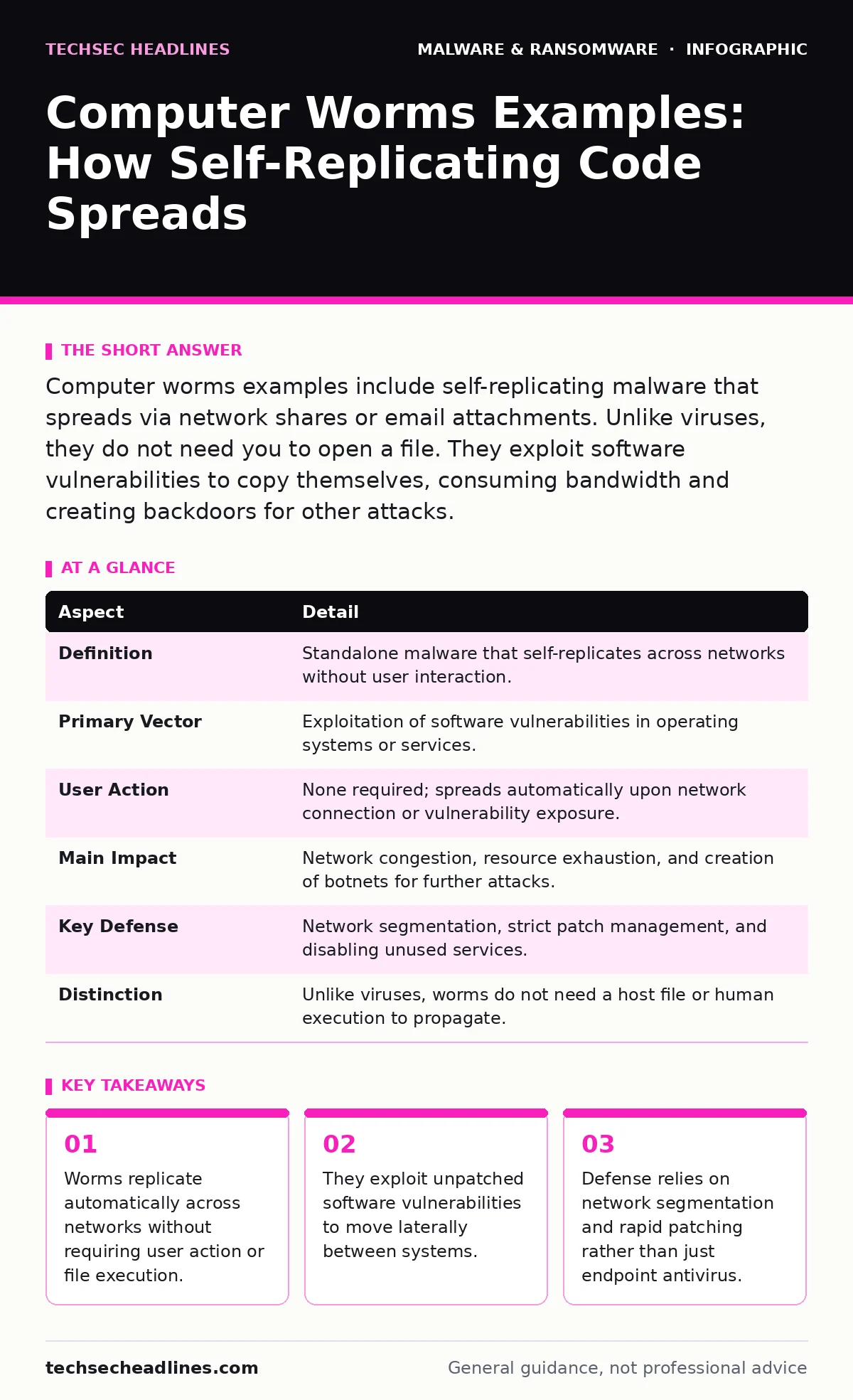
Computer worms examples include self-replicating malware that spreads via network shares or email attachments. Unlike viruses, they do not need you to open a file. They exploit software vulnerabilities to copy themselves, consuming bandwidth and creating backdoors for other attacks.
The Postcard Analogy for Self-Replication
Imagine a postcard that prints copies of itself and mails them to every address in a phone book. You do not need to read the postcard for it to spread. The act of receiving it triggers the duplication. This is how computer worms operate. They are standalone programs that replicate themselves across networks. They do not attach to other files. They do not wait for you to click a link. The worm finds a vulnerability, copies itself, and sends the copy to the next available target.
| Aspect | Detail |
|---|---|
| Definition | Standalone malware that self-replicates across networks without user interaction. |
| Primary Vector | Exploitation of software vulnerabilities in operating systems or services. |
| User Action | None required; spreads automatically upon network connection or vulnerability exposure. |
| Main Impact | Network congestion, resource exhaustion, and creation of botnets for further attacks. |
| Key Defense | Network segmentation, strict patch management, and disabling unused services. |
| Distinction | Unlike viruses, worms do not need a host file or human execution to propagate. |
Computer Worms Examples and How They Work
People searching for computer worms examples often look for famous names. The mechanism matters more than the name. A worm scans for open ports or vulnerable services. It checks if a specific software flaw exists. If the flaw is present, the worm injects its code. It then uses the compromised system to scan for more targets. This creates an exponential growth pattern. One infected machine can infect dozens in minutes. Those dozens infect hundreds. The speed depends on the scanning logic and the network size.
Worms often use standard protocols to move. They might use file sharing services to copy themselves to shared drives. They might use remote administration tools to execute commands on distant servers. The goal is propagation. Once spread, the worm may carry a payload. This payload could be a keylogger, a ransomware installer, or a backdoor. The worm itself is the delivery truck. The payload is the cargo. Understanding this separation helps you defend against the spread, not just the final attack.
Who Gets Infected and Why It Hurts
Worms affect any device connected to a network. This includes servers, workstations, and Internet of Things devices. The damage is not always data theft. Often, the damage is operational. Worms consume bandwidth and processing power. This slows down legitimate network traffic. Users experience lag. Applications time out. In severe cases, the network becomes unusable. This is known as a denial of service. The worm itself causes the outage by creating too much traffic.
Worms also create footholds for attackers. Once a worm is inside, it can download other malware. It can steal credentials. It can encrypt files. The worm opens the door. The attacker walks through. This makes worms a critical first step in many advanced attacks. They provide the initial access that allows deeper infiltration. Organizations with poor network visibility suffer the most. They do not see the worm moving until the payload activates. By then, the infection is widespread.
What People Usually Get Wrong About Worms
Many users believe that avoiding suspicious emails stops worms. This is incorrect. Worms do not need email. They exploit software flaws directly. You can receive no emails and still get infected if your system has an unpatched vulnerability. Another common mistake is relying solely on antivirus software. Antivirus scans for known signatures. Worms often use new exploits. If the antivirus does not recognize the exploit, it may not stop the worm. Behavioral detection helps, but it is not perfect.
People also underestimate the speed of worm propagation. They think they have hours to respond. Worms can infect an entire network in minutes. Delaying patching increases the risk significantly. Another error is ignoring internal traffic. Many security tools focus on external threats. Worms move laterally, from machine to machine inside the network. Monitoring internal traffic is essential for early detection. Without internal visibility, you miss the spread until it is too late.
Defending Against Worm Propagation
The best defense against worms is patching. Worms exploit known vulnerabilities. If you patch the software, the worm has no way in. Keep operating systems and applications updated. Disable automatic updates only if you have a strict testing process. Otherwise, let the system patch itself. This closes the doors the worm tries to use. Regular patching reduces the attack surface significantly.
Network segmentation is the second line of defense. Divide your network into smaller zones. If a worm infects one zone, it cannot easily jump to others. Use firewalls to restrict traffic between zones. Only allow necessary connections. This limits the blast radius. Even if a worm spreads, it stays contained. This gives you time to isolate and remove the infection. Segmentation adds complexity, but it saves you from total network failure.
See also: end of life equipment: why old hardware breaks your security stack
Detecting and Responding to Worm Activity
Detection requires monitoring network traffic. Look for unusual spikes in outbound connections. Worms scan for targets. This creates many small connections. A sudden increase in scanning activity indicates a worm. Monitor for repeated failed login attempts. Worms often try brute-force attacks. Alert on these patterns. Early detection allows you to isolate infected machines before the worm spreads further.
When a worm is detected, isolate the affected systems. Disconnect them from the network. Do not shut them down immediately, as this may destroy evidence. Instead, cut the network cable or disable the wireless adapter. Then, perform a thorough scan. Use tools that check for persistence mechanisms. Worms may install services or scheduled tasks to survive reboots. Remove these artifacts. Restore systems from clean backups if necessary. See our guide on removing malware from a Windows PC for detailed cleanup steps.
The Role of Advanced Security Tools
Standard antivirus may not catch new worms. Next-generation antivirus uses behavioral analysis. It watches what programs do, not just what they look like. If a program tries to scan for vulnerabilities, the tool blocks it. This stops the worm before it spreads. Intrusion detection systems also help. They analyze network packets for known exploit patterns. They can block the worm at the gateway.
Endpoint detection and response tools provide deeper visibility. They record process activity. You can see which program opened which port. This helps trace the worm's path. These tools integrate with security orchestration. They can automatically isolate infected hosts. This speeds up response time. Automation is key when dealing with fast-moving threats. Manual response is often too slow for modern worms.
Long-Term Resilience and Recovery
Recovery from a worm infection is not just about cleaning files. It is about restoring trust. You must verify that all persistence mechanisms are removed. Check for new user accounts. Check for modified system files. Use baseline comparisons to spot changes. Document the incident. Analyze how the worm entered. Update your security policies to prevent recurrence.
Plan for downtime. Worms can disrupt operations. Have a recovery time objective defined. This is the maximum time you can afford to be offline. Ensure your backups are clean and accessible. Test your recovery plan regularly. See our guide on recovery time objective for details on planning resilience. A tested plan reduces stress and confusion during an actual incident.
Key takeaways
- Worms replicate automatically across networks without requiring user action or file execution.
- They exploit unpatched software vulnerabilities to move laterally between systems.
- Defense relies on network segmentation and rapid patching rather than just endpoint antivirus.
Frequently asked questions
Can a computer worm spread through a USB drive?
Some worms can spread via removable media if autorun features are enabled. Disable autorun to prevent this vector.
Do firewalls stop computer worms?
Firewalls can block external scanning, but they may not stop worms already inside the network. Internal segmentation is needed.
How fast can a computer worm spread?
Worms can spread exponentially. In a large network, infection can reach all hosts in minutes if vulnerabilities exist.
Is a computer worm the same as a virus?
No. Viruses need a host file and user action. Worms are standalone and spread automatically via network vulnerabilities.
How this guide was produced: written by the TechSec Headlines editorial team with AI assistance, checked against the public references listed below, and reviewed when the facts change. See our editorial policy or report an error.