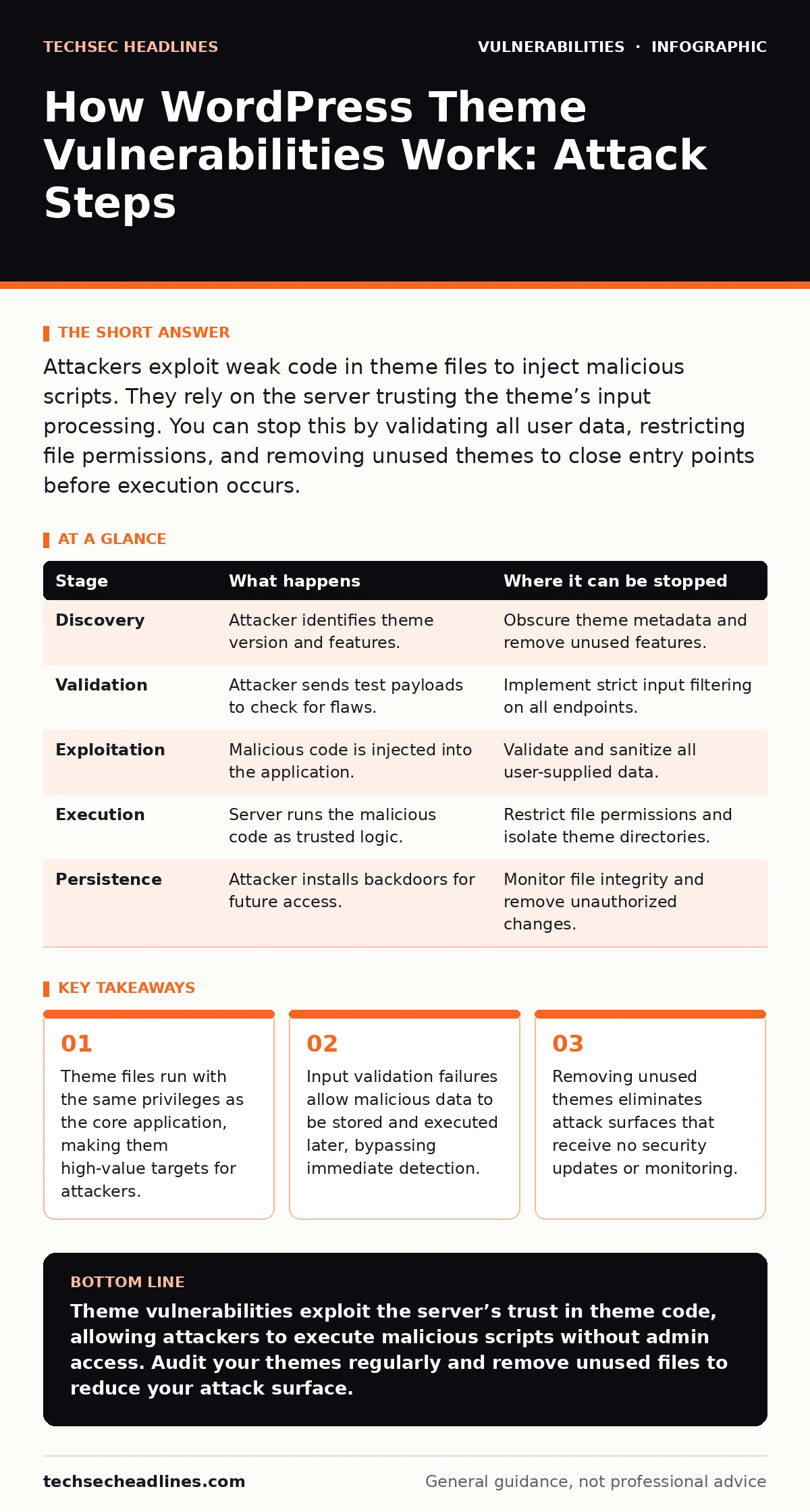
Attackers exploit weak code in theme files to inject malicious scripts. They rely on the server trusting the theme’s input processing. You can stop this by validating all user data, restricting file permissions, and removing unused themes to close entry points before execution occurs.
Understanding the Threat Model
WordPress themes control the visual presentation of your site. They contain PHP code that processes data and generates HTML output. When this code fails to validate user input, it creates a vulnerability. Attackers do not need to break into the server’s operating system. They only need to find a theme that trusts user-provided data. The server executes the theme’s code as if it were its own. This trust relationship is the foundation of every theme-based attack.
You must understand that a theme is not just a style sheet. It is an application component with full access to your database and file system. A single flaw in a theme can compromise the entire installation. The damage depends on how the flaw is exploited. Some flaws only allow defacement. Others allow full account takeover. The severity lies in the code’s failure to distinguish between safe data and malicious commands.
Stage 1: Discovery and Reconnaissance
The attacker begins by identifying your site’s theme. WordPress sites often reveal their theme name in the page source code or through predictable file paths. Automated tools scan the web for known vulnerabilities in popular themes. The attacker checks if your theme version matches a known exploit. This stage relies on public information. Theme developers often publish changelogs that detail fixed issues. These logs help attackers find unpatched versions. You can interrupt this stage by obscuring theme details.
Removing version numbers from headers and CSS files reduces the information available to attackers. This does not prevent discovery but slows down targeted attacks. The attacker may also look for unique features or plugins that interact with the theme. These interactions create additional entry points. A theme that allows custom CSS injection is a common target. The attacker tests for these features by sending harmless requests. The server’s response reveals whether the feature exists and how it processes data.
| Stage | What happens | Where it can be stopped |
|---|---|---|
| Discovery | Attacker identifies theme version and features. | Obscure theme metadata and remove unused features. |
| Validation | Attacker sends test payloads to check for flaws. | Implement strict input filtering on all endpoints. |
| Exploitation | Malicious code is injected into the application. | Validate and sanitize all user-supplied data. |
| Execution | Server runs the malicious code as trusted logic. | Restrict file permissions and isolate theme directories. |
| Persistence | Attacker installs backdoors for future access. | Monitor file integrity and remove unauthorized changes. |
Stage 2: Payload Construction
Once the target is identified, the attacker crafts a specific payload. This payload is designed to exploit the specific flaw in the theme. For example, if the theme fails to escape user input in a comment form, the attacker creates a script that breaks out of the HTML context. The payload often uses JavaScript to steal session cookies. It may also use PHP code if the flaw allows server-side execution. The attacker ensures the payload is small enough to fit in the input field. They also ensure it bypasses basic filters.
This stage requires technical knowledge of the theme’s code structure. The attacker reads the theme’s source code to find weak points. They look for functions that process data without sanitization. Sanitization removes harmful characters from input. Escaping converts special characters into safe text. If the theme skips these steps, the payload succeeds. You can interrupt this stage by enforcing strict input rules. Rejecting any input that contains unexpected characters stops the payload before it reaches the server. This approach reduces the attack surface significantly.
Stage 3: Injection and Storage
The attacker sends the payload to the vulnerable endpoint. This might be a comment form, a contact page, or a profile editor. The server receives the data and passes it to the theme’s processing logic. If the theme lacks proper validation, it accepts the payload. The malicious code is then stored in the database. It becomes part of the site’s content. This is known as stored cross-site scripting. The payload sits dormant until a user or administrator views the affected page. The attacker does not need to be present during this stage.
The injection happens once. The damage occurs every time the page is loaded. You can interrupt this stage by validating data at the point of entry. Checking that input matches expected formats prevents storage of malicious code. For example, a name field should only contain letters and spaces. Rejecting other characters stops the injection. This requires careful planning to avoid breaking legitimate functionality. Overly strict rules can frustrate users. Balancing security and usability is a constant challenge.
Stage 4: Execution and Impact
When a victim visits the page, the browser executes the stored payload. The malicious script runs in the context of the victim’s session. It can steal login credentials, session tokens, or personal data. If the victim is an administrator, the attacker gains full control of the site. The attacker can then install backdoors, modify content, or redirect traffic. This stage is often silent. The victim may not notice anything unusual. The damage accumulates over time.
You can interrupt this stage by using content security policies. These policies restrict which scripts can run on your site. Blocking inline scripts prevents many stored attacks. You can also monitor for unusual outbound connections. Sudden traffic to unknown domains may indicate data theft. This detection method helps identify breaches after they occur. It does not prevent the initial execution but limits the fallout. Regular audits of theme code help find these flaws before attackers do.
Stage 5: Persistence and Cleanup
After gaining access, the attacker ensures they can return. They may create a new administrator account. They might modify theme files to include a persistent backdoor. This allows access even if the original vulnerability is patched. The attacker may also remove logs to hide their tracks. This makes detection and recovery difficult. You can interrupt this stage by monitoring file integrity. Detecting unauthorized changes to theme files alerts you to a breach.
Restricting file permissions prevents attackers from writing new files. Using a web application firewall can block known malicious patterns. This adds a layer of defense above the application. It does not fix the underlying flaw but reduces the risk of exploitation. Regular updates to themes and plugins are necessary. Outdated software contains known vulnerabilities that attackers actively exploit.
Mitigation Strategies and Trade-offs
Preventing theme vulnerabilities requires a multi-layered approach. Start by choosing themes from reputable sources. Check for regular updates and active maintenance. Avoid themes that have not been updated in a long time. These are likely to contain unpatched flaws. Implement strict input validation on all user-facing forms. Reject any data that does not match the expected format. Use output escaping to ensure that stored data is safe to display.
This prevents scripts from executing in the browser. Monitor your server logs for suspicious activity. Look for repeated failed login attempts or unusual file access patterns. These signs often indicate an ongoing attack. Remove unused themes and plugins immediately. They provide unnecessary entry points for attackers. Each unused component increases your risk profile. This is a form of security technical debt that accumulates over time. Paying it down reduces your exposure.
Another layer of defense is restricting file permissions. Ensure that theme directories are not writable by the web server. This prevents attackers from uploading malicious files. Use a staging environment to test updates before applying them to production. This catches compatibility issues and potential security flaws. Educate your team about the risks of custom code. Unreviewed modifications can introduce new vulnerabilities.
Follow established security frameworks to structure your defenses. These frameworks provide a checklist of best practices. They help ensure that no critical step is missed. Remember that no single measure provides complete protection. You must combine multiple controls to reduce risk effectively. The goal is to make attacks difficult and detectable. This forces attackers to move on to easier targets.
Long-Term Security Maintenance
Security is an ongoing process, not a one-time fix. You must regularly review your theme’s code for new vulnerabilities. Subscribe to security advisories for your themes. Apply patches as soon as they are available. Delaying updates leaves you exposed to known exploits. Consider using automatic software updates for minor patches. This ensures that critical fixes are applied promptly. For major updates, test them in a staging environment first.
This prevents breaking your site’s functionality. Regularly audit your user accounts. Remove any accounts that are no longer needed. Restrict administrative access to trusted users only. Use strong, unique passwords for all accounts. Enable two-factor authentication to add an extra layer of security. This prevents attackers from using stolen credentials to gain access. Even if they exploit a theme vulnerability, they cannot log in without the second factor.
Monitor your site’s performance and logs regularly. Look for signs of compromise such as unexpected redirects or new files. Investigate any anomalies immediately. Assume that your site will be targeted. Plan for incident response. Have a backup strategy in place. Regular backups allow you to restore your site to a clean state. Test your backups to ensure they are valid. A backup that cannot be restored is useless in a crisis.
By combining proactive defense with reactive measures, you build resilience. This approach minimizes the impact of any successful attack. It also helps you recover quickly and efficiently. Security is a balance between protection and usability. Finding the right balance requires continuous effort and attention. Stay informed about new threats and update your defenses accordingly.
Key takeaways
- Theme files run with the same privileges as the core application, making them high-value targets for attackers.
- Input validation failures allow malicious data to be stored and executed later, bypassing immediate detection.
- Removing unused themes eliminates attack surfaces that receive no security updates or monitoring.
Theme vulnerabilities exploit the server’s trust in theme code, allowing attackers to execute malicious scripts without admin access. Audit your themes regularly and remove unused files to reduce your attack surface.
Frequently asked questions
How do I know if my WordPress theme is vulnerable?
Check the theme’s update history and security advisories. Look for known exploits in public databases. Scan your code for unsanitized input handling functions.
Can a security plugin stop a theme vulnerability?
Plugins can block known attack patterns but cannot fix flawed code. They provide an extra layer of defense but do not replace secure coding practices or timely updates.
What is the difference between a theme and plugin vulnerability?
Both are code flaws, but themes handle display logic while plugins add functionality. Theme flaws often involve input validation in forms, while plugin flaws may involve database queries or file handling.
Should I disable comments to prevent attacks?
Disabling comments removes one entry point but does not eliminate all risks. Attackers can target other forms or endpoints. Comprehensive input validation is necessary regardless of comment settings.
How this guide was produced: written by the TechSec Headlines editorial team with AI assistance, checked against the public references listed below, and reviewed when the facts change. See our editorial policy or report an error.