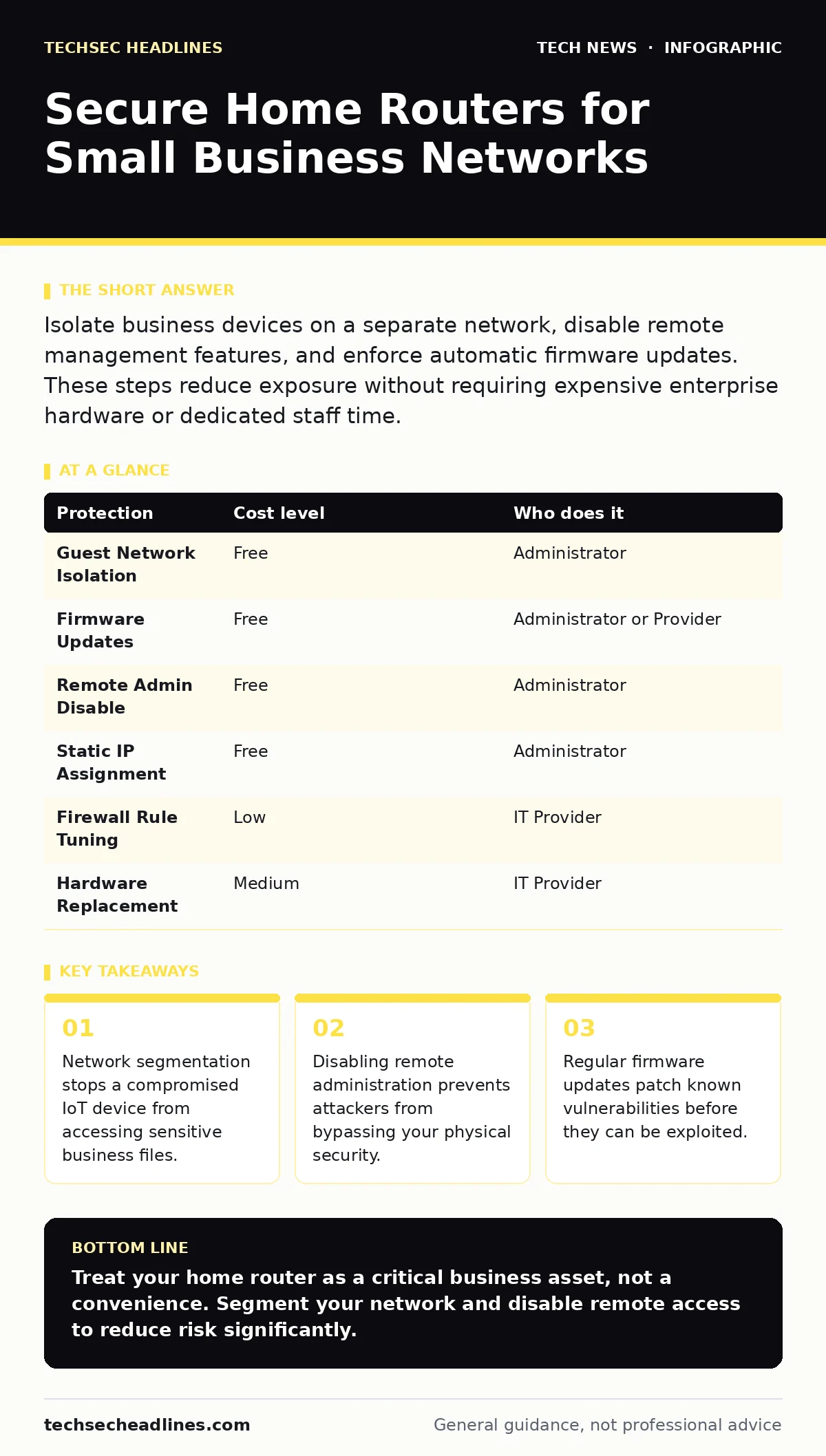
Isolate business devices on a separate network, disable remote management features, and enforce automatic firmware updates. These steps reduce exposure without requiring expensive enterprise hardware or dedicated staff time.
EXAMPLE: The Ten-Person Office
Imagine a ten-person company operating from a single residential location. The owner uses a standard consumer-grade router provided by the internet service provider. All employees connect their laptops, printers, and smart cameras to this single network. One employee’s laptop becomes infected with malware. Because there is no separation between devices, the malware scans the local network. It finds the open ports on the smart camera and the shared printer. The attacker moves laterally, accessing the owner’s financial records stored on a connected drive. This scenario illustrates why consumer hardware requires enterprise-level discipline.
Segmentation as a Control
Network segmentation divides a single physical network into smaller, isolated sub-networks. This prevents traffic from one segment from reaching another unless explicitly allowed. For a small business, this means creating a separate Wi-Fi network for guests and personal devices. Business laptops and servers remain on the primary network. If a guest device is compromised, the attacker cannot reach the business data. Most modern routers support this feature through a guest network setting. Enable this immediately. It is the most effective low-cost control available.
| Protection | Cost level | Who does it |
|---|---|---|
| Guest Network Isolation | Free | Administrator |
| Firmware Updates | Free | Administrator or Provider |
| Remote Admin Disable | Free | Administrator |
| Static IP Assignment | Free | Administrator |
| Firewall Rule Tuning | Low | IT Provider |
| Hardware Replacement | Medium | IT Provider |
The Firmware Update Trap
Router firmware is the software that controls the device. Manufacturers release updates to fix security holes. Many users disable automatic updates to avoid downtime. This is a dangerous trade-off. An unpatched router is vulnerable to known exploits that attackers scan for automatically. You must enable automatic updates if the router supports it. If it does not, you must check for updates manually on a monthly basis. Failure to update leaves the door open for remote code execution. This allows an attacker to take full control of the device.
Remote Administration Risks
Remote administration allows you to configure the router from outside your local network. This feature is often enabled by default. It exposes the router’s management interface to the entire internet. Attackers scan for open management ports. They use brute-force attacks to guess passwords. If they succeed, they can change DNS settings. This redirects your traffic to malicious sites. You must disable remote administration entirely. Configure the router only when physically present or connected to the local network. This eliminates the attack surface from the outside world.
DNS and Traffic Control
The Domain Name System translates human-readable website names into numerical IP addresses. A compromised router can alter these translations. This is known as DNS hijacking. Your user types a legitimate banking site, but the router sends them to a fake copy. You can mitigate this by using secure DNS services. Configure the router to use public, privacy-focused DNS resolvers. These services often block known malicious domains. This adds a layer of protection without installing software on every device. It works transparently in the background.
The IoT Device Problem
Internet of Things devices include smart thermostats, cameras, and printers. These devices often have poor security standards. They cannot run antivirus software. They frequently have hard-coded passwords. When connected to the main business network, they act as entry points. An attacker compromises the smart camera. From there, they pivot to the business laptop. You must place all IoT devices on the guest network. This isolates them from sensitive business data. If the camera is hacked, the attacker remains trapped in the guest segment. This containment strategy is critical for small businesses.
Delegating Technical Tasks
You do not need to be a network engineer to secure your router. However, you must know what to delegate. Complex firewall rules require expertise. Misconfigured rules can block legitimate traffic. This causes downtime and lost productivity. Hire an IT provider to review your firewall settings. Ask them to document every rule they create. This documentation helps future administrators understand the security posture. Do not let them leave without explaining the purpose of each change. You need to understand the logic, not just the result.
- Ask for a list of all open ports and their purposes.
- Request a diagram of the network segments.
- Verify that remote management is disabled.
- Confirm that firmware updates are scheduled.
Physical Access and Defaults
Physical access to the router grants full control. An attacker who touches the device can reset it. They can plug in a USB drive to install malicious firmware. Keep the router in a locked room. Change the default administrator password. Default passwords are widely known and listed in public databases. Use a long, random password for the router admin interface. This password should be different from your Wi-Fi password. Store it in a secure password manager. This prevents unauthorized configuration changes.
Questions for Your IT Provider
When hiring help, you need to verify their competence. Do not accept vague assurances. Ask specific questions about their security practices. This ensures they follow industry standards. It also holds them accountable for the configuration. Use these questions to evaluate their suitability for your needs.
- How do you handle firmware updates for managed devices?
- What is your process for isolating IoT devices from business data?
- Do you disable remote administration by default?
- How do you secure the router’s management interface?
- Can you provide documentation for all firewall rules?
These questions reveal their attention to detail. A provider who cannot answer them clearly may not prioritize security. You need a partner who understands the risks. This partnership is vital for long-term security.
Encryption and Data in Transit
Encryption scrambles data so only the intended recipient can read it. While the router does not encrypt your data, it can facilitate it. Ensure that HTTPS is used for all web traffic. Most modern browsers enforce this by default. However, internal services may not. Use tools that support encrypted connections for internal file sharing. This protects data even if the network is monitored. It adds a layer of security beyond the perimeter. This complements the router’s firewall rules.
Key takeaways
- Network segmentation stops a compromised IoT device from accessing sensitive business files.
- Disabling remote administration prevents attackers from bypassing your physical security.
- Regular firmware updates patch known vulnerabilities before they can be exploited.
Treat your home router as a critical business asset, not a convenience. Segment your network and disable remote access to reduce risk significantly.
Frequently asked questions
Can I use my home router for a small business?
Yes, if you implement strict segmentation and disable risky features like remote administration. Consumer hardware can be secure with proper configuration.
How often should I check router firmware?
Enable automatic updates if possible. If not, check manually once a month to ensure you have the latest security patches.
Is a guest network enough for IoT devices?
Yes, placing IoT devices on a guest network isolates them from your main business data, limiting the damage if they are compromised.
Do I need a business-class router?
Not necessarily. A well-configured consumer router with segmentation and updated firmware can provide adequate security for small teams.
How this guide was produced: written by the TechSec Headlines editorial team with AI assistance, checked against the public references listed below, and reviewed when the facts change. See our editorial policy or report an error.