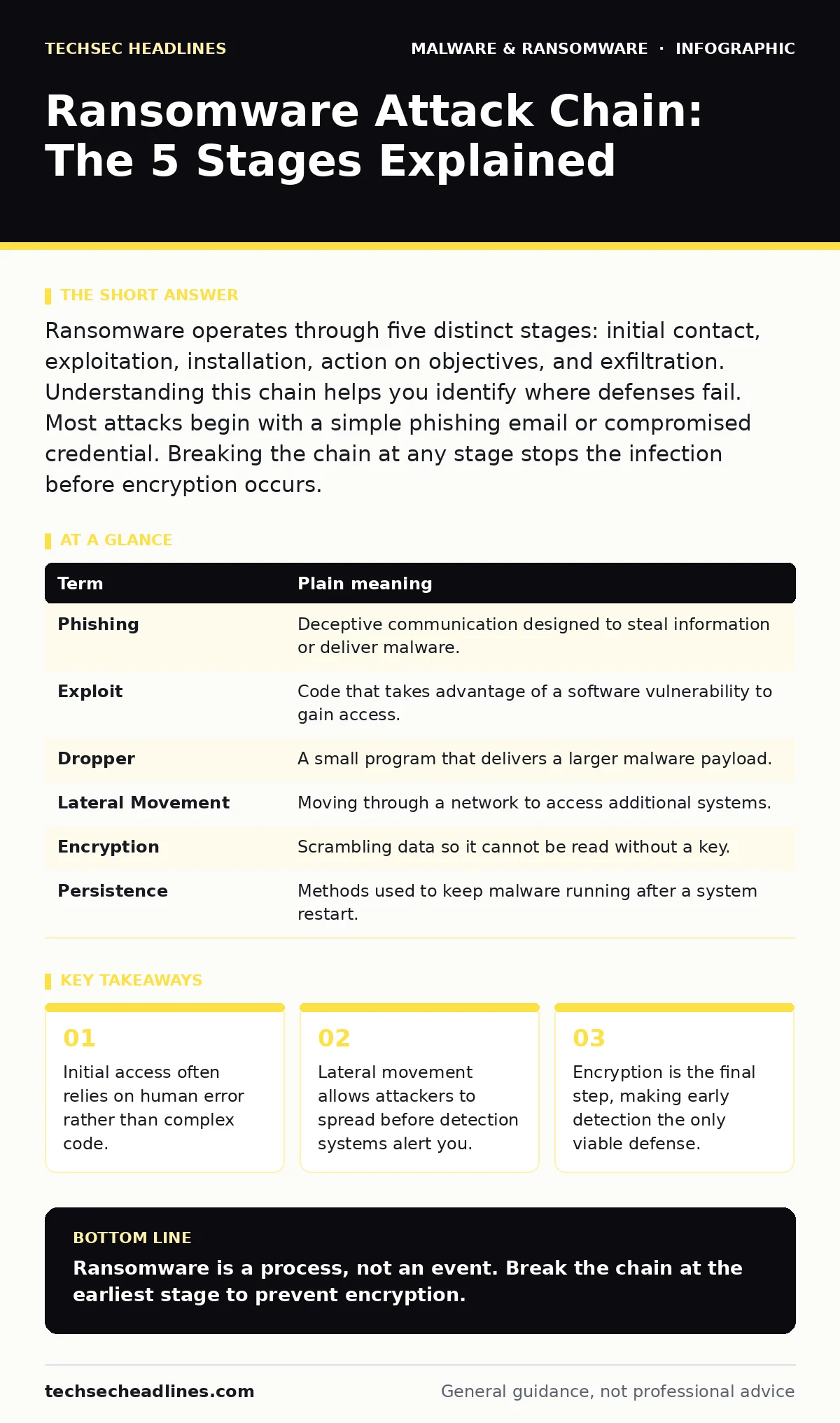
Ransomware operates through five distinct stages: initial contact, exploitation, installation, action on objectives, and exfiltration. Understanding this chain helps you identify where defenses fail. Most attacks begin with a simple phishing email or compromised credential. Breaking the chain at any stage stops the infection before encryption occurs.
The Burglar’s Methodology
Imagine a burglar who does not smash a window. Instead, they watch your house for weeks. They note when you leave, which locks are weak, and where you hide the spare key. They do not break in until they have a plan to bypass every alarm. They enter quietly, copy your documents, and only then lock you out. Ransomware follows this same patient, methodical approach. It is not a random smash-and-grab. It is a calculated sequence of events designed to maximize damage while minimizing the chance of early detection.
Stage 1: Initial Contact
The attacker must first reach your system. This often happens through phishing, where a deceptive email tricks you into clicking a malicious link or opening an infected attachment. Sometimes, the attacker exploits a vulnerability in a public-facing service, such as a web server with an outdated plugin. This stage relies on your interaction or a technical flaw. If you never click the link, the chain breaks here.
Stage 2: Exploitation
Once contact is made, the attacker attempts to exploit a weakness. This might involve running a script that takes advantage of a bug in your operating system or software. If the system is properly patched, this step fails. The attacker cannot proceed without gaining some level of access. This is where next-generation antivirus solutions often intervene, detecting the unusual behavior of the exploit attempt before it executes fully.
Stage 3: Installation
After gaining access, the attacker installs the malware. This is not always immediate. They may drop a malware dropper, a small program designed to fetch the actual ransomware payload from a remote server. This separation makes detection harder because the initial file looks harmless. The dropper waits for the right moment to download the main threat, often using malware persistence mechanisms to ensure it survives a system reboot.
Stage 4: Lateral Movement
Before encrypting anything, the attacker moves through your network. They look for other computers, servers, and storage devices. This is known as lateral movement. They use stolen credentials to log into other machines, spreading like a computer worm but more selectively. They map your network to find the most valuable data. If your network segments are not isolated, the attacker can move freely. This stage is often invisible to standard security tools.
Stage 5: Action on Objectives
Finally, the attacker executes the ransomware. They encrypt your files, making them unreadable. They may also exfiltrate data before encryption, threatening to leak it if you do not pay. This is the point of no return. By the time you see the ransom note, the damage is done. The attacker has already achieved their goal. Prevention must happen in the earlier stages.
Common Points of Confusion
Many people confuse the initial access method with the malware itself. The phishing email is not the ransomware; it is the delivery mechanism. Others believe that antivirus software alone prevents ransomware. While helpful, traditional antivirus often misses new variants. You need layered defenses. Rootkits can hide the presence of malware, making it seem like your system is clean when it is not. Understanding these distinctions helps you build better defenses.
Try This Now
- Audit your email settings to block executable attachments by default.
- Enable multi-factor authentication on all critical accounts to stop credential theft.
- Review your network segmentation to limit lateral movement.
| Term | Plain meaning |
|---|---|
| Phishing | Deceptive communication designed to steal information or deliver malware. |
| Exploit | Code that takes advantage of a software vulnerability to gain access. |
| Dropper | A small program that delivers a larger malware payload. |
| Lateral Movement | Moving through a network to access additional systems. |
| Encryption | Scrambling data so it cannot be read without a key. |
| Persistence | Methods used to keep malware running after a system restart. |
Breaking the Chain
You cannot stop every attempt, but you can break the chain. Focus on the early stages. Train users to recognize phishing. Patch systems regularly to close exploits. Use PowerShell logging to detect suspicious commands during lateral movement. Segment your network to contain infections. These steps are not optional. They are the difference between a minor incident and a total loss.
Key takeaways
- Initial access often relies on human error rather than complex code.
- Lateral movement allows attackers to spread before detection systems alert you.
- Encryption is the final step, making early detection the only viable defense.
Ransomware is a process, not an event. Break the chain at the earliest stage to prevent encryption.
Frequently asked questions
Can ransomware infect my phone?
Yes, mobile ransomware exists, though it is less common than PC variants. It often locks the screen or encrypts media files.
Is paying the ransom a good idea?
No, paying does not guarantee file recovery. It also encourages further attacks and may be illegal in some jurisdictions.
How do I remove ransomware?
You typically cannot decrypt files without the key. You must remove the malware, often by reinstalling the operating system, and restore from clean backups.
What is the difference between malware and ransomware?
Malware is any malicious software. Ransomware is a specific type of malware that encrypts data and demands payment for decryption.
How this guide was produced: written by the TechSec Headlines editorial team with AI assistance, checked against the public references listed below, and reviewed when the facts change. See our editorial policy or report an error.